Pinterest Video DownloaderSave High-Quality MP4 Videos, Reels & Stories Online
Save-Pins is a dedicated online Pinterest video downloader engineered to help you save public Pinterest video pins, idea pins, reels, and stories in high-definition MP4 format with original sound intact.
Seamlessly compatible across iPhone, iPad, Android, Windows, and Mac browsers. Simply paste any valid Pinterest URL to preview and download your media instantly.
Why Use Save-Pins?
Save-Pins makes it easy to save publicly accessible Pinterest videos for offline viewing or personal use.
No Pinterest login required
— use the public Pin URL.
Works on mobile and desktop
— use Chrome, Safari, Edge, Firefox, or another modern browser.
MP4 video downloads
— save compatible Pinterest video media in a widely supported format.
No software installation
— the downloader works through your browser.
Available video quality
— download the quality made available for the individual Pin.
Simple process
— copy the Pin link, paste it, preview the video, and download it.
The available result depends on the individual Pinterest Pin and the media that Pinterest makes publicly accessible.
How to Download a Pinterest Video
You only need the URL of the individual public Pinterest Pin.
Visual Step-by-Step Screenshots
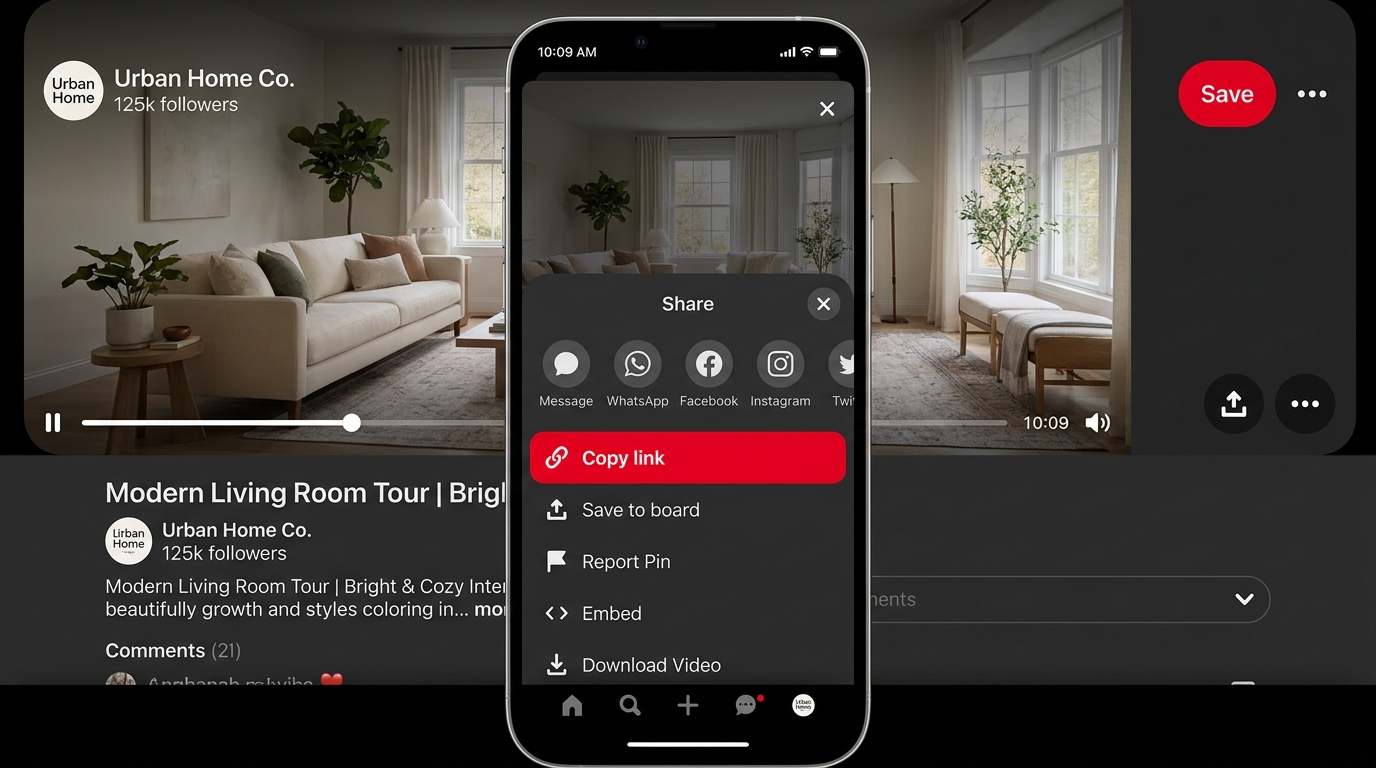
Copy the Pin Link
Open the video Pin on Pinterest and tap Share → Copy Link.
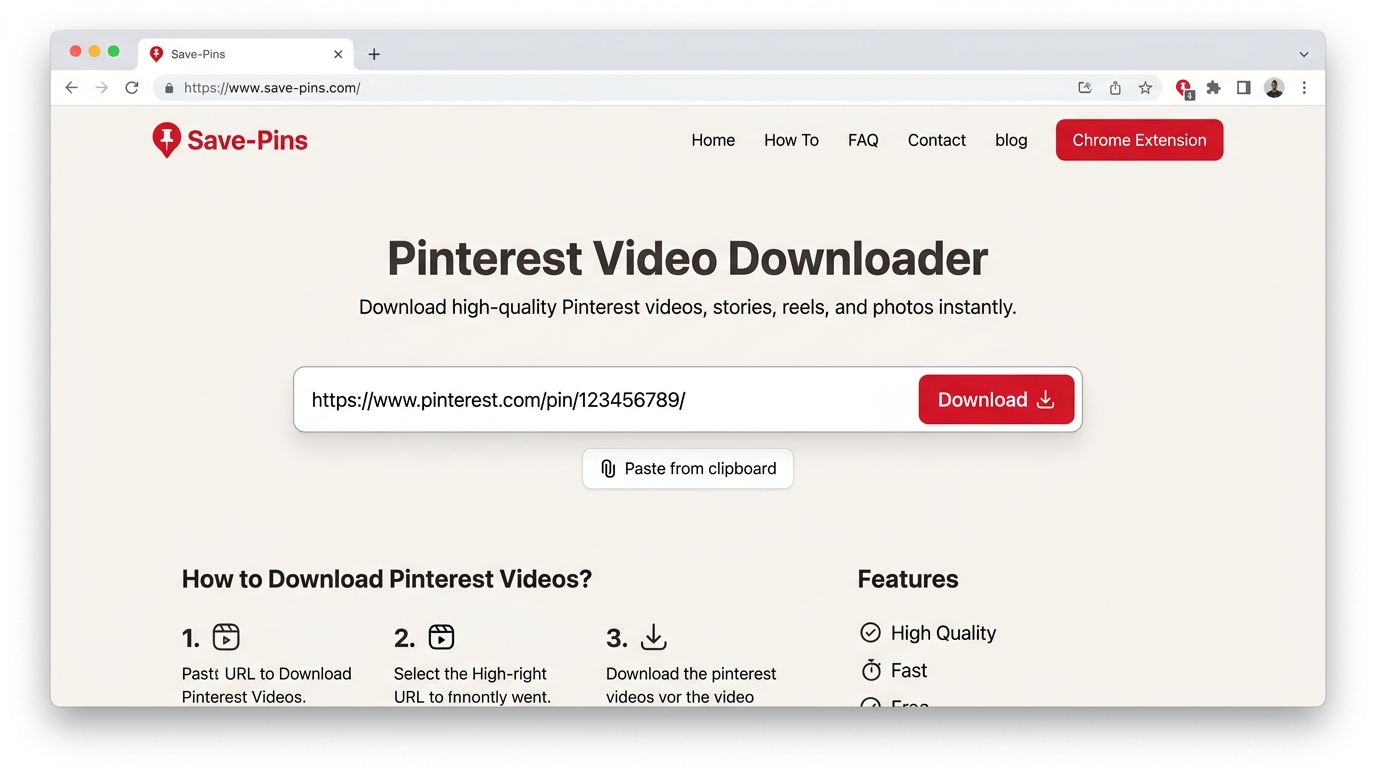
Paste on Save-Pins
Paste the copied URL into the Save-Pins downloader bar.
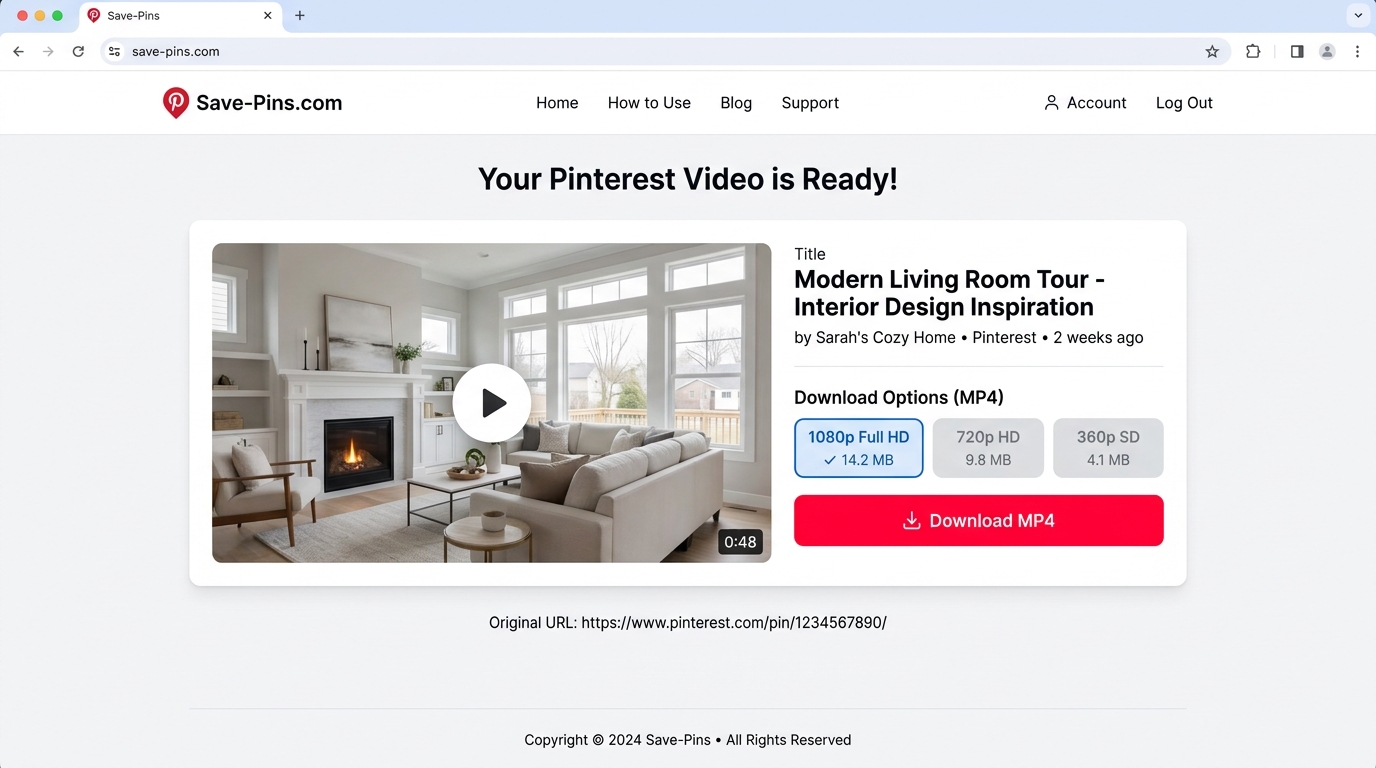
Preview & Download MP4
Preview the video, pick your quality, and tap Download MP4.
Download Pinterest Videos on Mobile
- 1Open the video Pin in the Pinterest app.
- 2Tap Share and select Copy Link.
- 3Open Save-Pins in Chrome, Safari, or another modern mobile browser.
- 4Paste the Pinterest Pin URL into the downloader.
- 5Preview the available video.
- 6Select a quality if multiple options are available.
- 7Tap Download to save the video.
On Android, the downloaded file usually appears in your browser's Downloads folder. On iPhone or iPad, check the Files app or the download location configured for Safari.
Download Pinterest Videos on Desktop
- 1Open the Pinterest Pin on Pinterest.
- 2Copy the URL from your browser's address bar.
- 3Open Save-Pins and paste the Pin URL.
- 4Click Download.
- 5Preview the available video and choose a quality if offered.
- 6Save the MP4 file to your computer.
If you cannot find the file, open your browser's download history or check its default Downloads folder.
Which Pinterest Links Work?
Save-Pins works with publicly accessible links that identify an individual Pinterest Pin and contain compatible media.
Supported Links | Not Supported |
|---|---|
| •Direct public Pin URLs | •Pinterest board URLs |
| •Public pin.it share links | •Pinterest profile URLs |
| •Public Pins with accessible video | •Private or invitation-only Pins |
| •Public video Pin links | •Deleted or unavailable Pins |
| •Public Pins that do not require login | •Content requiring restricted access |
Always copy the link from the individual Pin, not from a Pinterest board, profile, search page, or category page.
Direct Public Pinterest Pin Links
A direct Pin URL identifies one specific Pinterest post. This is the preferred link type for Save-Pins.
Open the Pin first, then copy its URL or use Pinterest's Share option to copy the link.
Short Pinterest Pin.it Links
Pinterest can create short links beginning with pin.it when you share Pins.
If the short link leads to a publicly accessible Pin, Save-Pins can use it to identify the related content.
Public Pinterest Video Pins
The downloader can process a public Pin when Pinterest makes a compatible video stream available.
The video quality and available media depend on the source Pin.
What Can You Download From Pinterest?
Save-Pins focuses on publicly accessible Pinterest video content. The exact media available depends on the individual Pin.
Pinterest Videos
Download compatible public Pinterest videos as MP4 files.
The resolution can vary between Pins because Pinterest may provide different versions of the same video.
Pinterest GIFs
Some Pinterest Pins contain animated media. A compatible downloadable file may be available when the Pin exposes the media in a supported format.
Pinterest Idea Pins and Video Content
Pinterest has used different formats for publishing visual content over time. If a public Pin contains an accessible video stream, Save-Pins may be able to process that video.
Availability depends on the individual Pin rather than only the content category.
Pinterest Carousels
A Pinterest carousel can contain multiple images or media items.
Save-Pins is designed around individual Pin media rather than downloading an entire board or collection at once. If a specific item contains an accessible video, open that individual Pin and submit its URL.
Pinterest Video Quality, Format, and Watermarks
Pinterest Video Quality
Save-Pins provides the video quality available from the individual public Pin.
One Pinterest video may offer a higher-resolution version while another may only provide a lower-resolution source.
Save-Pins does not create missing detail by upscaling a low-resolution source.
MP4 Video Format
Compatible video downloads are provided in MP4 format.
MP4 is widely supported by Android phones, iPhones, iPads, Windows PCs, Macs, Chromebooks, tablets, and most modern media players.
Pinterest Video Watermarks
Save-Pins does not add, remove, or edit watermarks.
If the original video contains a creator watermark, logo, username, or other visual mark, it remains part of the downloaded source.
Downloading a video does not give you permission to remove creator attribution or reuse copyrighted material.
How Save-Pins Works Behind the Scenes
Our online Pinterest video downloader operates through a rapid 5-stage pipeline designed for speed, privacy, and maximum video fidelity.
Paste Pinterest Link
Paste any public Pinterest URL into the input field. We accept both standard pinterest.com/pin/... addresses and mobile pin.it short links.
Resolve Pin Metadata
Our engine resolves short redirects to canonical URLs, reads publicly available Pin data, and verifies that the media is unrestricted.
Extract Video Stream
Save-Pins detects the raw CDN video stream and inspects available quality presets, preserving full 1080p or 720p bitrates and audio tracks.
Preview Video & Audio
Inspect a playable video preview right inside the browser to verify picture clarity, sound synchronicity, and duration before saving.
Save Watermark-Free MP4
Click Download to save the MP4 video directly into your device’s local storage. Clean original file with zero added watermarks.
Pro Tip: Mobile pin.it Short Links
When copying links from the official Pinterest mobile app, you will often receive a shortened pin.it/... URL. Save-Pins automatically follows and resolves these links to their original Pin destination.
100% Client-Safe & No Registration
We never prompt you for login credentials or store personal browser history. Downloads are streamed directly over secure HTTPS from public content delivery networks.
Download Pinterest Videos on Any Device or OS
Because Save-Pins is an entirely browser-based web application, it requires no software installations, jailbreaking, or APK downloads. Experience effortless video saving on every screen.
iPhone & iPad
Download videos directly in mobile Safari or Chrome without installing third-party App Store utilities.
- Tap the Safari download indicator after clicking Download
- Open the downloaded MP4 in the Files app
- Tap Share → Save Video to move directly to your Photos Camera Roll
Android Devices
Seamless downloads on Samsung Galaxy, Google Pixel, Xiaomi, OnePlus, and all modern Android handsets.
- Works with Chrome, Samsung Internet, Firefox, and Opera
- Files automatically save directly into your Downloads folder
- Instantly accessible from Google Photos, Gallery, or file managers
Windows Laptops & PCs
High-speed desktop video saving through Microsoft Edge, Google Chrome, Firefox, or Brave browsers.
- One-click direct MP4 downloads with maximum available bitrate
- Automatic storage in your standard PC Downloads directory
- Universal compatibility with Windows Media Player, VLC, and editors
Apple Mac (macOS)
Optimized for MacBook Pro, MacBook Air, iMac, and Mac mini on both Apple Silicon and Intel systems.
- Native playback in QuickTime Player with zero codec conversion
- Fast downloads in Safari, Chrome, and Arc browsers
- Easily import clips into Premiere Pro, Final Cut, or DaVinci Resolve
Where will my downloaded Pinterest MP4 videos be saved?
Downloaded videos automatically go to your browser's standard download destination (e.g. the Downloads folder on Windows/Mac/Android, or the Files app on iPhone). You can change this anytime in your browser settings.
Why a Pinterest Video Might Not Download
A failed download does not always mean there is a problem with Save-Pins. Pinterest links and media can change, and some Pins do not provide a downloadable video.
Wrong Pinterest Link Type
Board, profile, search, and category URLs do not identify one specific video.
Private or Restricted Pinterest Pin
Save-Pins cannot access private or invitation-only content.
Deleted or Unavailable Pinterest Pin
If a Pin is no longer publicly accessible, Save-Pins cannot retrieve its media from that Pin.
No Video Available
Some Pins contain only images, text, or other media.
Pinterest Media or URL Changed
Pinterest can change how media is delivered or how a Pin's URL works.
Pinterest Downloader Privacy and Safety
Save-Pins does not require your Pinterest username or password. You only need to provide the public Pin URL you want to process.
Do not enter your Pinterest password, verification code, or account credentials into a third-party downloader.
Save-Pins is designed to process publicly accessible content without requiring Pinterest account access.
For information about data handling, cookies, retention, and other service practices, review the Privacy Policy and Terms of Service.
No Pinterest Login Required
You can use Save-Pins without entering your Pinterest username or password.
Only provide the public Pinterest Pin URL needed for the download process.
No Software Installation
Save-Pins works through a modern web browser. You do not need to install a separate downloader application or desktop program.
Responsible Use and Pinterest Creator Rights
A public Pinterest Pin is not automatically free to copy, publish, or use commercially.
Downloading a video and having permission to reuse that video are two different things.
Public Pinterest Content Can Still Be Copyrighted
Pinterest contains content created by individuals, businesses, photographers, artists, brands, and other rights holders.
A video being visible to the public does not remove copyright protection.
Respect Pinterest Creators
Do not use downloaded content to impersonate a creator, remove attribution, claim someone else's work as your own, or republish copyrighted content without permission.
Commercial Use of Pinterest Videos
If you plan to use a Pinterest video for advertising, marketing, YouTube, Instagram, a business website, or another commercial project, confirm that you have the required rights.
Download Content You Have Permission to Use
The safest approach is to download your own content or content that you have clear permission to save and reuse.
Always follow the creator's stated license, attribution requirements, and applicable copyright rules.
Where Are Downloaded Pinterest Videos Saved?
The downloaded video is normally saved using your browser's standard download system.
Android
Check the Downloads folder in the Files app.
iPhone and iPad
Check the Files app and your browser's selected download location.
Windows
Open the Downloads folder or your browser's download history.
Mac
Check the Downloads folder in Finder.
Chromebook
Open the Files app and check Downloads.
If you cannot find the video, open your browser's download history to locate the file.
Frequently Asked Questions About Pinterest Video Downloads
Find answers to common questions about downloading Pinterest videos with Save-Pins.
Yes. Save-Pins is available as a free online Pinterest video downloader. You do not need to create an account or purchase a subscription to process a supported public Pin.
Pinterest Download Guides
Use these guides for detailed help with Pinterest links, video downloads, and common download problems.
How to Copy a Pinterest Pin Link
Learn how to find the individual Pin URL and copy it from the Pinterest app or desktop website.
Why Is My Pinterest Video Download Not Working?
Learn how to check the Pin URL, public access, video availability, browser issues, and other common causes of failed downloads.
How to Download Pinterest Videos on iPhone and Android
Follow device-specific steps for copying a Pinterest link and downloading the available video through a mobile browser.
How to Find the Original Source of a Pinterest Image
Learn how to check the Pin description, creator profile, destination website, and other clues to identify where an image originally came from.
Video Tutorial: How to Use the Pinterest Video Downloader
Watch the Save-Pins tutorial to see how the complete download process works.
The basic process is:
Save-Pins Interactive Walkthrough
From copying any public Pin link to receiving your clean MP4 video download.
The same basic workflow works on mobile phones, tablets, and desktop computers.
Our Network Sites
Explore other online tools and resources from our network.
Each tool is designed for a specific digital task and can be accessed directly through a web browser.
Save-Pins Video Downloader
Free browser-based public Pinterest video and MP4 media downloader.
Online Media Converter
Fast browser utility to convert web video files and extracts audio effortlessly.
Web Image Optimizer
Compress and resize JPG, PNG, and WebP assets directly in your browser.
Support Save-Pins
If Save-Pins helps you save a useful public Pinterest video, you can support the project by sharing the downloader with friends, creators, students, and other Pinterest users.
Save-Pins is designed to keep Pinterest video downloads simple: copy the Pin, paste the URL, preview the media, and download.
For questions about copyright, privacy, and permitted use, review the applicable Privacy Policy, Terms of Service, and copyright information before downloading or reusing content.
Page Updates
We periodically review this page as Pinterest changes its URLs, media delivery methods, and content formats.